Module Employee Filters
The Module Employee Filters Maintenance allows you to configure Module Level Employee filters which provide the ability to have different subsets of the Employee population available through different modules in LightWork, if implemented. By default, all Employees would be available in all Modules.
This Maintenance is controlled through Group Security by the ‘Module Level Employee Filters Access’ securable.
Note: If you see the Module Employee Filters Maintenance available for selection under the System Maintenance, you have been granted at least some visibility through Security Access for this Maintenance.
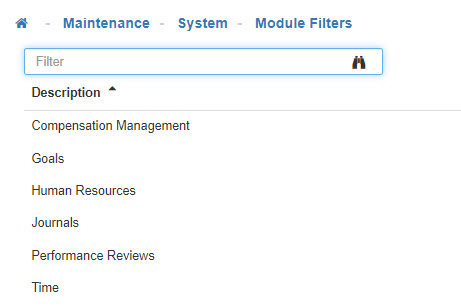
Module Employee Filters
Allows Administrative Users to configure filters that apply per module to segregate Employees for consumption in the various modules.
-
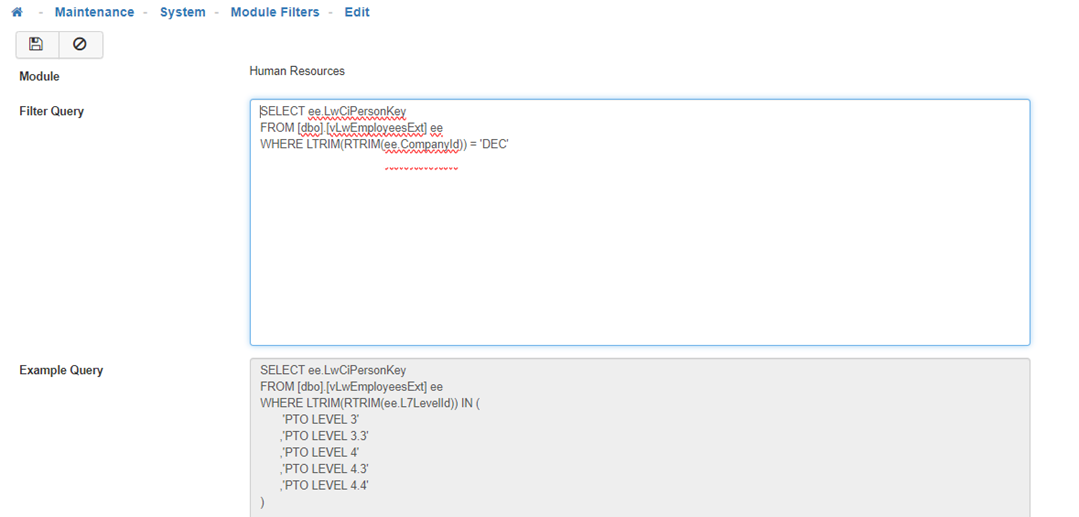
Module Employee Filter
Select a 'Module Employee Filter' from the list. -
Filter Query
In the 'Filter Query' enter the SQL query for the rules you would like to apply to the Module Employee Filter. -
Save
Once you are satisfied with you selections, click on 'Save'.